Doorbell height

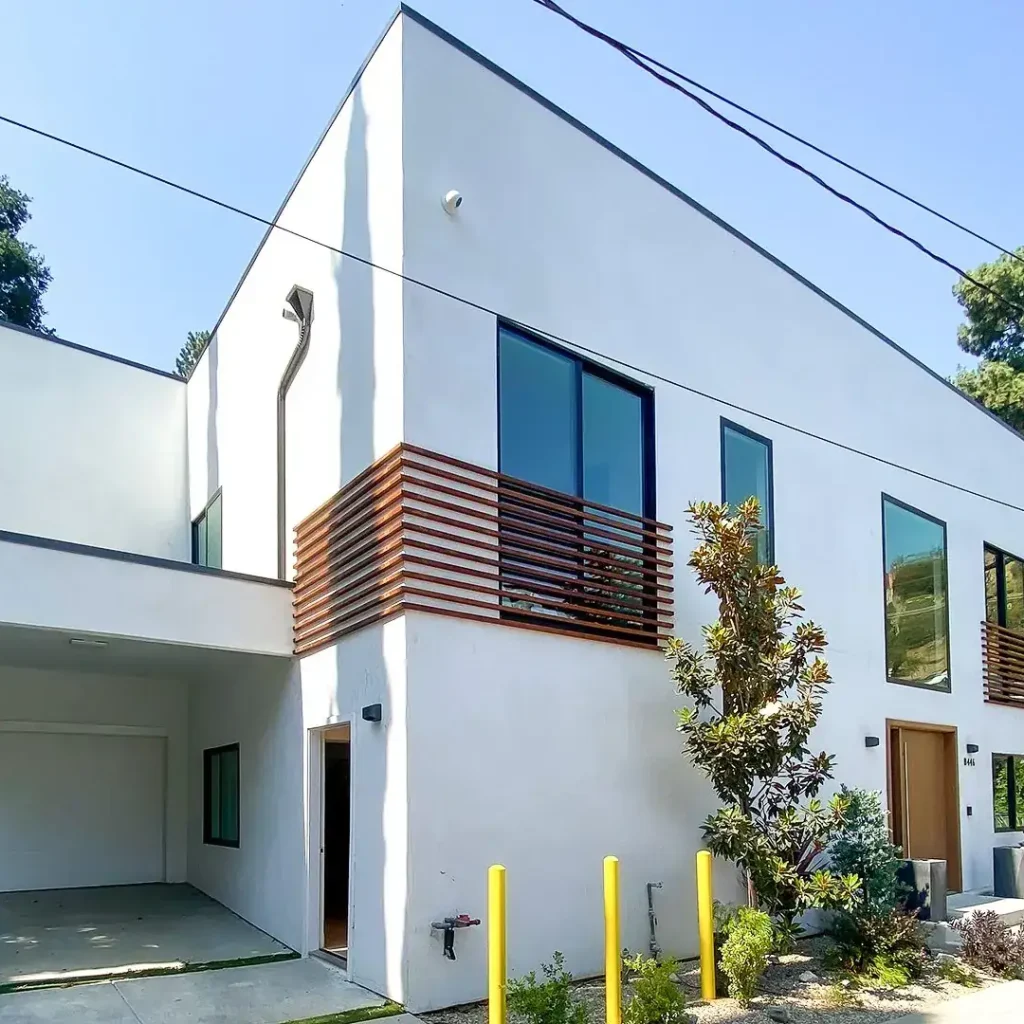
Ring recommends mounting a video doorbell about 4 feet (48 inches) above the ground.

  • If the door is to the side of the walkway, use a wedge or corner kit to angle the camera toward visitors.
  • Avoid aiming straight into the afternoon sun or a bright street light, which turns faces into silhouettes.
  • Check the view in the app's Live View before drilling the final holes.

Press Esc or the × button to close.

Wi-Fi at the door

  • Stand at the door with your phone on your home Wi-Fi and run a speed test. If it struggles, the doorbell will too.
  • In the Ring app, Device Health shows signal strength (RSSI). Numbers closer to zero are better.
  • Fixes include a mesh node near the entry, Alarm Pro's built-in eero router, or wired/PoE cameras.
  • Brick, stucco with wire mesh and metal doors block signal more than you'd think.

Press Esc or the × button to close.

Motion & privacy zones

  • Motion zones: draw them around your walkway and porch, not the street or the sidewalk.
  • Privacy zones black out areas the camera must never record, like a neighbor's window or yard.
  • Lower motion sensitivity for busy streets, and use schedules or Modes so indoor cameras don't record while you're home.
  • Smart alerts (person, package, vehicle) need a Ring Protect plan and cut noise a lot.

Press Esc or the × button to close.

Battery vs wired

  • Battery: no wiring needed, great for rentals and condos. Busy entries drain batteries faster, so plan to recharge, or add a solar panel outside.
  • Wired / plug-in / PoE: no recharging and more consistent performance. Best for main entries, driveways and 24/7 recording (a plan add-on).
  • Existing doorbell wiring? A wired doorbell is usually the better choice. We check the transformer and chime compatibility.

Press Esc or the × button to close.

Mistakes to avoid

  • Mounting cameras too high, so you only see hats and hoods.
  • Skipping the Wi-Fi check at the door, gate and garage.
  • Sharing your Ring password instead of adding people with User Permissions.
  • Letting the free 30-day plan trial lapse without noticing that recordings stopped.
  • Putting cameras on the same network as your laptops and phones.
  • Recording audio where conversations of neighbors or passers-by are picked up. California has strict audio-recording rules, so consider turning off audio on cameras facing public areas.

Press Esc or the × button to close.

End-to-end encryption tradeoffs

Ring's default encryption (TAKE) keeps smart features working. Optional end-to-end encryption (E2EE) means only your enrolled phones can view video, Ring included.

  • With E2EE on you lose Alexa and Fire TV viewing, ring.com viewing, shared users, smart alerts, Familiar Faces, Video Search and Virtual Security Guard.
  • If you lose the 12-word passphrase, Ring cannot recover your videos.
  • A common setup: E2EE on indoor cameras, default encryption on outdoor cameras.

Press Esc or the × button to close.

Product

Ring Security, Installed Right in Los Angeles

Clear video at the door, alerts you can trust and a private network behind it. Build your Ring system in five simple steps, and a Ring Authorized Partner will install it right the first time.

Ring Authorized Partner
  • Ring Authorized Partner
  • Your Ring account stays in your name
  • Network secured before we mount a camera

Build your Ring system .

Five short steps. Tap + Interested on anything you like and tap a photo for details. Your picks are collected into a quote request at the end. Nothing is ordered or charged.

  1. 1Cameras & doorbellThe starting point
  2. 2Alarm systemRing Alarm or Alarm Pro
  3. 3SensorsChoose what to protect
  4. 4Add-onsLights, chime, car & more
  5. 5Indoor camerasYes or no

Not sure? Start from a preset.

Pick the closest match. We'll pre-select the usual devices, and you can change anything in the steps below.

Step 1 of 5

Cameras & doorbell .

Know who's at your door before you open it, wherever you are. A video doorbell and a few well-placed cameras let you see, hear and talk to visitors from your phone, and record what happens on the driveway, side yards and back door. On vacation, one look at the app tells you everything is fine at home.

Video doorbells

Wired Doorbell 4K Pro

Ring's most advanced wired doorbell.

Wired Doorbell 2K Plus

Sharp 2K video at the door, with alerts that tell you what is happening.

Wired Doorbell 2K

The essentials at the front door, always powered.

Battery Doorbell 4K Pro

Ring's most advanced battery doorbell: head-to-toe 4K with no wiring.

Battery Doorbell 2K Plus

No wiring needed.

Battery Doorbell 2K

See who is at the door with no wiring at all.

Peephole Cam 2K

A video doorbell for apartments and condos, with no drilling.

Outdoor cameras

Outdoor Cam 4K Pro

Ring's most advanced go-anywhere outdoor camera.

Outdoor Cam 4K Plus

A 4K camera you can put almost anywhere.

Outdoor Cam 2K (formerly Stick Up Cam)

A weather-resistant camera that also suits garages and workshops.

Spotlight Cam 4K Pro

4K video plus bright spotlights that make intruders think twice.

Spotlight Cam 4K Plus

Camera plus motion-activated spotlights.

Spotlight Cam 2K

Lights and a siren for side entrances and narrow paths.

Floodlight Cam 4K Pro

Ring's most advanced floodlight camera for large outdoor areas.

Floodlight Cam 4K Plus

Floodlights and a 4K camera in one fixture.

Floodlight Cam 2K

Bright floodlights and essential camera features for big outdoor spaces.

Pro & PoE line: Elite and Dome

Panoramic and tamper-resistant 4K cameras for estates, large yards and businesses. Most run best on a wired PoE network, which we design and install.

Wired Doorbell 4K Elite

A professional-grade doorbell on Ethernet that can also open your gate.

Ring Elite 140

Two 4K views stitched into one 140° picture.

Ring Elite 180

Wall-to-wall 180° coverage from one camera.

Ring Elite 270

Sees around the corner: two sides of your property at once.

Ring Elite 360

Ceiling-mounted, 360° business camera.

Ring Dome Cam 4K

A low-profile, tamper-resistant 4K dome built for business.

PoE+ Converter Mount

Turns compatible USB-C Ring cameras into wired PoE cameras.

Tips:

Ring Elite 360 and Dome Cam 4K are built mainly for businesses; Elite 140, 180 and 270 also suit large homes and estates.

Installer tip · Wired PoE

Wire it once with Power over Ethernet

Many wired Ring cameras can run on Power over Ethernet (PoE): a single network cable that carries both power and data.

  • Stable connection. No Wi-Fi dropouts, even at the far end of the yard.
  • Harder to knock offline. A wired camera is not affected by Wi-Fi jammers or deauthentication attacks that can cut off wireless cameras.
  • No batteries. Nothing to recharge, and recording is always on power.
  • The catch: it needs cabling. Each camera needs an Ethernet run back to a PoE switch. That is exactly what a site visit is for: we plan cable routes, the switch and backup power before anything is mounted.
Book a wiring consultation
PoE switch+ UPS backupONE ETHERNET CABLEpower + data, no Wi-Fi neededCAM

Ring models with a PoE option

  • Outdoor Cam 4K Plus and Spotlight Cam 4K Plus (PoE versions)
  • Outdoor Cam 4K Pro and Spotlight Cam 4K Pro (PoE+ install)
  • Indoor Cam 4K (PoE version)
  • Dome Cam 4K (PoE or PoE+)
  • Ring Elite 140, 180, 270 and 360 (PoE Type 4)
  • Wired Doorbell 4K Elite (PoE+)
  • Compatible USB-C Ring cameras, through Ring's PoE+ Converter Mount

Battery cameras and the Floodlight Cam 4K Plus and 4K Pro do not use PoE. Ring Elite needs PoE Type 4 (802.3bt); standard 15.4W PoE is not enough. Checked on ring.com product pages, November 2026.

Step 2 of 5

Alarm system .

An alarm turns your cameras into a real security system. Arm it as you leave, and every protected door and window is watched; if someone gets in, the siren sounds and your phone knows instantly. Both kits use the same sensors. The difference is the router: Alarm Pro has eero Wi-Fi 6 built in and can stay online over cellular during an outage.

Ring Alarm (8-piece kit)

The core Ring alarm system.

  • Base station with built-in siren and backup battery
  • Kit covers 4 doors or windows plus 1 motion detector
  • Keypad to arm and disarm

Best for: Homes that already have a good router and network.

Ring Alarm Pro (8-piece kit)

Alarm plus a built-in eero Wi-Fi 6 router.

  • Built-in eero Wi-Fi 6 router
  • 24-hour backup battery
  • Optional cellular Backup Internet with a compatible plan

Best for: Homes that also need better Wi-Fi, or want the alarm to stay online during an outage.

Peace of mind · Human monitoring

Real people watching over your home

An alarm is only as good as the response. With an optional Ring monitoring plan, trained agents are on watch 24/7, so someone acts even when you're on a plane, at dinner or asleep.

Ring Pro plan

24/7 professional monitoring

When the alarm goes off, agents verify the alert, call you and request police, fire or medical dispatch when needed. Fire dispatch is requested for every carbon monoxide emergency.

Virtual Security Guard

Live guard monitoring

While your system is armed, trained agents watch live video when a person is detected on an enrolled camera. They can speak through the camera, sound the siren, text and call you and your emergency contacts with a video link, and request emergency dispatch if they see a break-in or theft.

Patrol & private guards

Your patrol service, in the loop

In eligible areas, Ring's Private Guard Response lets Virtual Security Guard send a private security guard instead of police when someone stays on your property. Already use a local patrol company or private guards? We help you set up emergency contacts and coordinate the response plan with them.

Monitoring services are paid Ring subscriptions, and availability varies by area. Agents see live video only during an event; they cannot open your saved recordings. Your city may require an alarm permit. Details from ring.com/plans and Ring Help, checked November 2026.

Step 3 of 5

Sensors .

Sensors give every door, window and room a voice. You hear about an open back door, a leak under the sink or a smoke alarm while you're away, so small problems don't become big ones. Pick what you want to protect: doors, windows, rooms, water, fire, the climate in the attic and even the mailbox.

Window & Door Sensor

Alerts when a door or window opens.

Outside Door Sensor

Contact sensor for gates, sheds and outside doors.

Motion Detector

Detects movement in a room or hallway.

Glass Break Sensor

Listens for shattering glass.

Flood & Freeze Sensor

Leak and freezing-temperature alerts.

Smoke & CO Listener

Listens for your existing alarms.

Alarm Keypad

Arm and disarm from another entry.

Panic Button

Call for help with one press.

Alarm Range Extender

Extends the reach of your alarm sensors.

Mailbox Sensor

Know when the mail arrives, or when someone opens your mailbox.

Temperature & Humidity Sensor

Watches the climate in places you rarely check.

Retrofit Alarm Kit

Brings the wired door and window sensors of an old alarm into Ring Alarm.

Sump Pump Monitor

An alert the moment water reaches the floor, before damage starts.

Air Quality Monitor

See what you are breathing at home.

The siren is built into every Ring Alarm base station.

Tips:
Step 4 of 5

Add-ons .

Extras that make your home easier to live in and harder to target. Light the path when someone walks up, hear the doorbell in any room, keep battery cameras charged by the sun and keep an eye on your car. We only recommend what fits your property.

Light up the property

Solar Pathlight

Lights the walkway when someone walks up.

Smart Floodlight (Wired)

Bright motion-activated light over the driveway and side yards.

Smart Lighting Transformer

Makes your existing landscape lights smart.

Smart Spotlight (Battery)

Motion light for garages, sheds and porches, no wiring.

Around the house

Access Controller Pro 2

Open your electric gate from anywhere, and let deliveries in safely.

Ring Beacon

A solar security sign that tells passersby the home is protected.

Chime Plus

Hear the doorbell and Ring alerts in any room.

Solar Panel (USB-C)

Keeps battery cameras charged by the sun.

Intercom Kit

Swap an old intercom panel for a Ring video doorbell.

Your car

Car Tracker and Alarm

Alerts for bumps and break-ins, plus your car's location on a map.

New from Ring

Drone Cam

An indoor camera that flies room to room.

Rover Cam

Autonomous wheeled security for businesses.

Ring Smart Lock

Fingerprint, PIN, app and Alexa unlock.

Drone Cam, Rover Cam and Smart Lock are newly announced. We'll confirm availability before you order. Ring smart lights connect over Amazon Sidewalk or a Ring Bridge.

Step 5 of 5

Indoor cameras .

Check on the kids, the dog or an empty house from anywhere, and see exactly what happened if the alarm goes off. Indoor cameras are optional: your outdoor cameras and alarm already cover the perimeter. We place them at entrances and main rooms, never in private spaces.

Do you want indoor cameras?

Works with Alexa · Echo Show

“Alexa, show me the front door.”

Link your Ring account to Alexa and your cameras appear on the screens you already use. See who's at the door from the couch, answer without getting up, and hear Alexa tell you someone's there before they knock twice.

  • “Alexa, show the front door.”Live View from your Ring doorbell or camera on Echo Show, Echo Hub, Fire TV and Fire tablets.
  • “Alexa, talk to the front door.”Two-way talk with visitors from an Echo Show, or from an Echo speaker with no screen at all.
  • Doorbell and motion announcementsYour Echo devices chime and announce when the doorbell is pressed or motion is detected; screens show Live View right after a doorbell press. Person and package announcements need a Ring plan.
  • Picture-in-picture on Fire TVYour camera appears in the corner of the TV while you keep watching, on select Fire TV and Echo Show models.
  • Routines and voice controlUse Ring in Alexa routines, turn on Ring smart lights by voice, and say “Alexa, arm Ring” with a compatible Ring plan.

We link your accounts and test each command with you. Features vary by Alexa device and region. Sources: Ring Help on Alexa, Live View & picture-in-picture, announcements and supported devices, checked November 2026.

Echo Show 5 (3rd Gen)

A compact Alexa screen that shows your Ring cameras.

Your system .

Here's what you picked. Send it to us and we'll reply with a layout idea and next steps. No obligation.

  • Remove anything with ×, or go back and add more.
  • Prefer to talk? Call (310) 995-2721 or email sales@bbone.tech.
  • Ring Authorized Partner serving Los Angeles homes and businesses.

Ring Authorized Partner

Your Ring system

    Nothing selected yet. Go back to Step 1 and tap + Interested, or just describe what you need in Notes.


      Good to know .

      The details, folded away until you need them.

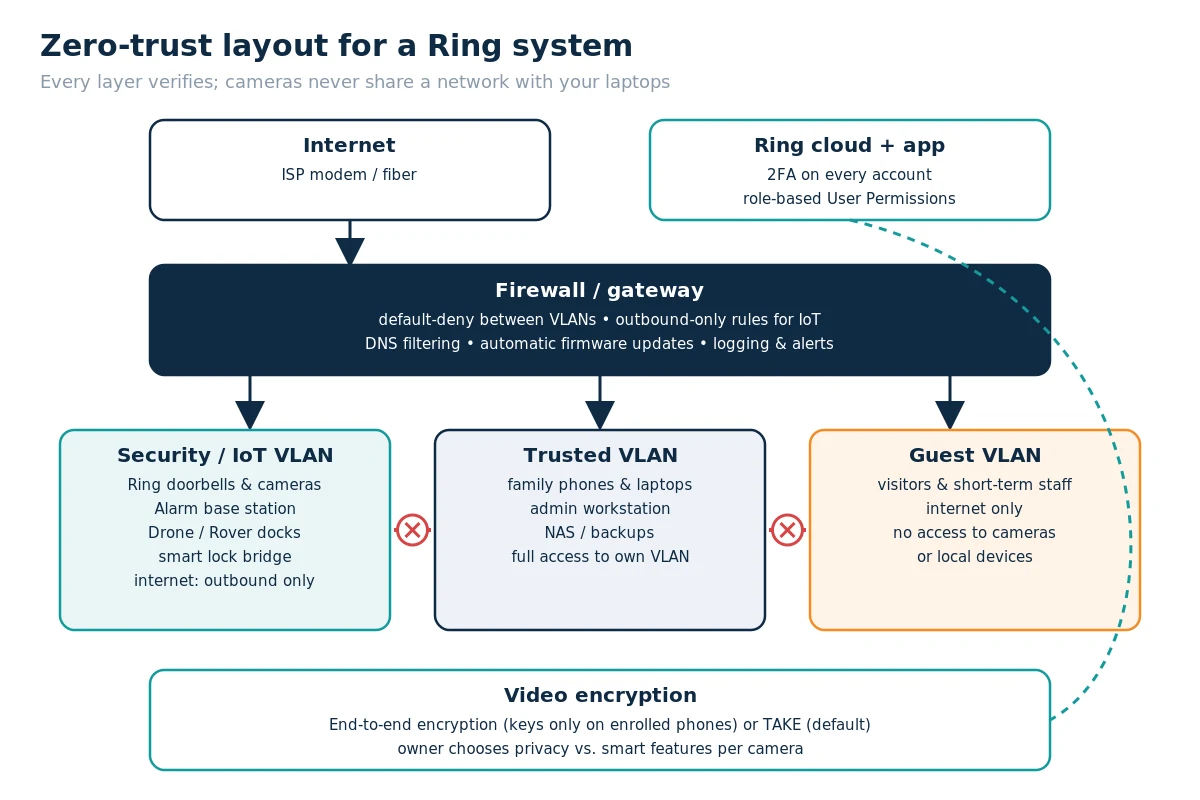
      A camera system is only as private as the network and accounts behind it. We set it up zero-trust: no device or user is trusted by default.

      View the network diagram

      1. Segmented network

      Ring cameras, doorbells, the alarm base and robot docks go on a dedicated security/IoT VLAN or SSID. The firewall blocks traffic from that segment to your laptops, phones and NAS, and allows only the outbound connections the devices need. Guests get their own isolated network. See our networking and Wi-Fi page.

      2. Right gateway choice

      Ring Alarm Pro is designed to be the main router, and features like 24/7 Backup Internet only work in that role. If your property already has a business-grade firewall with VLANs, we usually pair it with standard Ring Alarm instead, so we never weaken the network to fit the alarm.

      3. Least privilege for people

      Ring User Permissions (introduced February 2026) offer Limited, Standard, Advanced, Installer and Owner roles. Staff and house sitters get Limited or Standard access, and only the owner manages billing. Our technicians use Installer access, which expires automatically after 48 hours. You never share your password with us.

      4. Two-step verification

      Ring requires two-step verification on every account. We make sure the codes go to the owner’s phone, set a strong unique password stored in a password manager, and review the list of authorized client devices in Control Center.

      5. Video encryption: TAKE or end-to-end

      Ring’s default TAKE (Throw Away the Key) encryption keeps smart features working. Optional end-to-end encryption means only your enrolled phones can view video, and nobody else, Ring included.

      The tradeoff is real: with E2EE on, you lose Alexa and Fire TV viewing, ring.com viewing, shared users, smart alerts, Familiar Faces, Video Search and Virtual Security Guard, and Ring cannot recover your videos if you lose the 12-word passphrase. You can enable it per camera, for example on indoor cameras only.

      6. Updates and monitoring

      Ring devices update their firmware automatically. We keep the router and firewall firmware current, turn on alerts for devices going offline, and check the system at handover and on request.

      A Ring plan is where peace of mind gets real: your video history, smarter alerts and, on the top plans, real people who respond for you. Live view, motion alerts and two-way talk work without a plan. Here is what each plan adds:

      Solo covers one device. VSG = Virtual Security Guard.
      FeatureSoloMultiProVSG
      Video history (up to 180 days)✔✔✔✔
      Person, Package and Vehicle alerts✔✔✔✔
      Extended Live View and Device Modes✔✔✔✔
      Covers every device at the location–✔✔✔
      Extended warranty on eligible devices–✔✔✔
      24/7 professional alarm monitoring––✔✔
      Backup Internet for Alarm Pro––✔✔
      Video Descriptions, Familiar Faces, Active Warnings––✔✔
      Live video monitoring by trained agents–––✔

      Good to know: 24/7 continuous recording is an optional add-on per camera. New devices get a free 30-day trial unless the location already has a plan, and plans auto-renew until canceled. Some features vary by state (for example, Familiar Faces is not offered in Illinois or Texas), and your city may require a permit for monitored alarms. Ring recommends Pro for Ring Alarm owners. We help you pick the plan that fits during the consultation.

      Who watches when you can’t: with the Pro plan, monitoring agents respond to alarm events, call you and request police, fire or medical dispatch. With Virtual Security Guard, trained agents also watch live video when a person is detected while your system is armed, talk to them through the camera, sound the siren, contact you and your emergency contacts, and request dispatch if needed. In eligible areas, Private Guard Response can send a private security guard instead of police. If you already work with a local patrol company or private guards, we help coordinate them with your plan. Monitoring is a paid add-on; we’ll walk you through the options during the consultation.

      Plan features from ring.com, checked November 2026; Ring may change plans at any time.

      1. Walkthrough. We visit or video-call to look at entries, sight lines, Wi-Fi coverage, power and wiring, and what you want to protect.
      2. Design & Quote. You get a device map, the recommended Ring plan and any network upgrades needed, with no surprise subscriptions.
      3. Network First. We fix weak Wi-Fi and set up the security VLAN, firewall rules and PoE before mounting a single camera.
      4. Install. We mount and wire devices, set motion and privacy zones, create modes, add sensors and connect locks.
      5. Accounts & Access. The account stays in your name. We set roles for family or staff, confirm 2FA and pick an encryption mode with you.
      6. Handover. We walk you through the app, test alarms and alerts with you, and leave a one-page summary of your system.

      Doorbell height

      Ring recommends mounting a video doorbell about 4 feet (48 inches) above the ground.

      • If the door is to the side of the walkway, use a wedge or corner kit to angle the camera toward visitors.
      • Avoid aiming straight into the afternoon sun or a bright street light, which turns faces into silhouettes.
      • Check the view in the app’s Live View before drilling the final holes.

      Wi-Fi at the door

      • Stand at the door with your phone on your home Wi-Fi and run a speed test. If it struggles, the doorbell will too.
      • In the Ring app, Device Health shows signal strength (RSSI). Numbers closer to zero are better.
      • Fixes include a mesh node near the entry, Alarm Pro’s built-in eero router, or wired/PoE cameras.
      • Brick, stucco with wire mesh and metal doors block signal more than you’d think.

      Motion & privacy zones

      • Motion zones: draw them around your walkway and porch, not the street or the sidewalk.
      • Privacy zones black out areas the camera must never record, like a neighbor’s window or yard.
      • Lower motion sensitivity for busy streets, and use schedules or Modes so indoor cameras don’t record while you’re home.
      • Smart alerts (person, package, vehicle) need a Ring Protect plan and cut noise a lot.

      Battery vs wired

      • Battery: no wiring needed, great for rentals and condos. Busy entries drain batteries faster, so plan to recharge, or add a solar panel outside.
      • Wired / plug-in / PoE: no recharging and more consistent performance. Best for main entries, driveways and 24/7 recording (a plan add-on).
      • Existing doorbell wiring? A wired doorbell is usually the better choice. We check the transformer and chime compatibility.

      Mistakes to avoid

      • Mounting cameras too high, so you only see hats and hoods.
      • Skipping the Wi-Fi check at the door, gate and garage.
      • Sharing your Ring password instead of adding people with User Permissions.
      • Letting the free 30-day plan trial lapse without noticing that recordings stopped.
      • Putting cameras on the same network as your laptops and phones.
      • Recording audio where conversations of neighbors or passers-by are picked up. California has strict audio-recording rules, so consider turning off audio on cameras facing public areas.

      End-to-end encryption tradeoffs

      Ring’s default encryption (TAKE) keeps smart features working. Optional end-to-end encryption (E2EE) means only your enrolled phones can view video, Ring included.

      • With E2EE on you lose Alexa and Fire TV viewing, ring.com viewing, shared users, smart alerts, Familiar Faces, Video Search and Virtual Security Guard.
      • If you lose the 12-word passphrase, Ring cannot recover your videos.
      • A common setup: E2EE on indoor cameras, default encryption on outdoor cameras.

      Names follow Ring’s July and August 2026 renaming, where generation labels such as “2nd Gen” were replaced with 2K or 4K. The devices themselves did not change.

      Questions .

      Short answers to what clients ask most.

      Yes. BB One Technologies is a Ring Authorized Partner and is listed in Ring’s professional installer directory. To see the listing, open Ring Pro Install and enter ZIP 90068. We install and secure Ring products whether you buy them from us, from Ring, from Amazon or from another retailer, and the Ring account always stays in your name. To reach us, call (310) 995-2721 or email sales@bbone.tech.

      Ring Authorized Partner

      Many wired Ring cameras can. Outdoor Cam 4K Plus, Spotlight Cam 4K Plus and Indoor Cam 4K come in PoE versions, and Outdoor Cam 4K Pro and Spotlight Cam 4K Pro can be installed on PoE+. Dome Cam 4K runs on PoE or PoE+, the Ring Elite family (140, 180, 270 and 360) supports PoE Type 4 (802.3bt; standard 15.4W PoE is not enough), and the Wired Doorbell 4K Elite runs on PoE+. Ring’s PoE+ Converter Mount adds PoE to compatible USB-C cameras. Battery cameras and the Floodlight Cam 4K Plus and 4K Pro do not use PoE. PoE gives a stable connection that Wi-Fi jammers cannot knock offline and removes batteries, but it needs Ethernet cabling, so we plan it during a free consultation. More about wired PoE.

      No. Ring devices offer live view, alerts and two-way talk without a plan. Video history, smart alerts and professional monitoring need a Ring Protect plan. New devices come with a free 30-day trial unless the location already has a plan.

      It works well for small businesses. Ring offers business-focused hardware like Ring Elite cameras, the Mobile Security Tower and Rover Cam, role-based user permissions for staff, and professional monitoring at commercial addresses. Smoke and CO monitoring is not available at commercially zoned addresses, so a business needs a separate fire-alarm solution.

      Ring does not natively support Apple Home. When a client wants everything in the Home app, we discuss HomeKit-native cameras and doorbells, or a mixed setup. See our Apple HomeKit page.

      It gives the strongest privacy, but it turns off many smart and sharing features, and lost recovery keys cannot be recovered by Ring. Many clients keep the default TAKE encryption on outdoor cameras and use end-to-end encryption only on indoor cameras.

      Not yet. Ring lists U.S. shipping from January 27, 2027, pending FCC authorization. Rover Cam, the business robot, is listed to ship from December 16, 2026.

      Ring stopped selling the Car Cam in February 2024, so we do not install it. Ring now offers a separate Car Tracker and Alarm.

      The alarm base station has a backup battery. With a compatible plan, Alarm Pro can switch to cellular Backup Internet. Battery cameras keep recording but need internet to upload. Wired cameras need backup power, such as a UPS for the network and PoE switch.

      Let's Plan Your Ring System

      Build your system above, or just call (310) 995-2721. A Ring Authorized Partner, local to Los Angeles.

      Ring and related marks are trademarks of Amazon.com, Inc. or its affiliates. Product photos and details are from ring.com product pages; availability as of November 2026 and may change.

      Shopping Basket